
Best Free Net Worth Trackers for Everyday Households

Last verified: September 2026.
Net worth is simply everything owned minus everything owed, and tracking it over time shows whether a household’s overall financial position is improving, even in a month when the checking account balance alone looks unchanged. This guide covers what counts as an asset or a liability, compares two genuinely free tracking options with very different trade-offs, and flags a few popular tools that market themselves as free net worth trackers but, as of this writing, are not.
Quick Answer: A spreadsheet costs nothing and keeps every number private, but requires manual updates. Empower’s Personal Dashboard is free and automatically pulls balances from linked accounts, in exchange for Empower using that data to offer its paid wealth management service. Wealthfolio is a free, open-source app that tracks net worth locally on a device without requiring any account linking, with an optional paid add-on for automatic syncing. Apps like Monarch Money and Kubera are sometimes described online as free net worth trackers but currently offer only a short trial, not a free tier.
What Counts as an Asset or a Liability
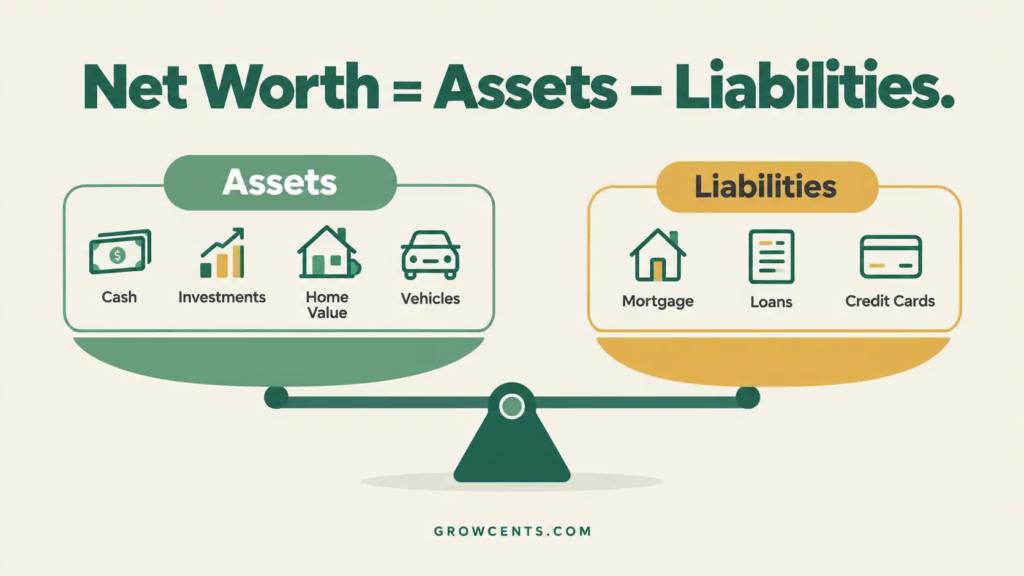
Net worth is calculated as total assets minus total liabilities. Assets include cash in checking and savings accounts, investment and retirement account balances, the current value of real estate, and vehicles. Liabilities include mortgage balances, car loans, student loans, and credit card balances. Everyday items like furniture or electronics are usually left out, since they are difficult to value accurately and rarely change the overall picture enough to matter.
Free Net Worth Tracking Options Compared
| Option | How It Works | Main Trade-Off |
|---|---|---|
| Empower Personal Dashboard | Links to bank, investment, and loan accounts and calculates net worth automatically | Free, but Empower uses the linked data to market its paid wealth management service to users with larger investment balances |
| Wealthfolio | A free, open-source app that stores data locally on the device; manual entry and CSV import included free | No account linking means more manual upkeep unless the optional paid sync add-on is used |
| DIY spreadsheet | A simple list of assets and liabilities, updated by hand on whatever schedule is chosen | Requires the most manual effort, but keeps every number entirely private with no third party involved |
Empower Personal Dashboard
Empower (formerly Personal Capital) offers a free dashboard that aggregates linked bank, investment, and loan accounts into a single net worth figure, updated automatically as account balances change. The free dashboard also includes a retirement fee analyzer and basic spending and investment tracking. The trade-off is built into the business model: Empower is a financial advisory firm, and the free dashboard exists in part to identify users with larger investable assets who may be contacted about its paid wealth management service. For a household comfortable linking accounts and willing to receive occasional sales outreach, this is a genuinely free and capable option.
Wealthfolio
Wealthfolio takes a different approach: it is an open-source application that stores financial data locally on the user’s own device rather than on a company’s servers, and its core features, including net worth tracking, spending views, and manual or CSV-based account entry, are free with no account or subscription required. An optional paid subscription, Wealthfolio Connect, adds automatic syncing from brokerages and encrypted multi-device sync for those who want less manual upkeep. This option suits a household that specifically wants to avoid linking bank credentials to a third-party server.
Net Worth Formula — Infographic
Building It Yourself in a Spreadsheet
A net worth spreadsheet is simpler to build than a full budget spreadsheet: two columns (assets and liabilities), a row per account or item, and a SUM formula for each column plus a subtraction formula for the net total. The same tab-and-formula approach covered in the guide to building a budget spreadsheet applies here, just with a much shorter category list. Updating it monthly or quarterly, by pulling current balances from each account’s own login page, keeps it accurate without requiring any account linking at all.
Apps That Market Themselves as Free but Aren’t
Several well-known tools are sometimes described online as free net worth trackers but, as of this writing, do not offer a permanent free plan: Monarch Money offers only a 7-day trial before requiring a paid subscription, and Kubera offers a 14-day trial for a nominal fee before billing its annual plan. Neither should be assumed free based on general reputation; checking the company’s own current pricing page before signing up is the only reliable way to confirm what a specific tool actually costs today.
How Your Net Worth Compares (Context, Not a Target)
According to the Federal Reserve’s 2022 Survey of Consumer Finances, the most recent edition available, the median net worth among U.S. households was $192,700, while the average (mean) was over $1 million, a gap driven by a relatively small number of very high-net-worth households. Net worth also varies enormously by age, since older households have generally had more years to pay down debt and build savings or home equity. These figures are offered as general context, not a benchmark to compare against; a household’s own net worth trend over time is a more useful and less discouraging measure of progress than any single comparison to a national figure.
How Often to Update It
Monthly or quarterly updates are typical for most households; daily or weekly tracking usually just reflects short-term market movement in investment accounts rather than any meaningful change in overall financial position. A fixed schedule (the first weekend of the month, for example) keeps the habit consistent without becoming a source of unnecessary daily stress over market swings.
Common Mistakes
- Overvaluing personal property. Furniture, electronics, and most vehicles depreciate quickly; using resale value rather than purchase price keeps the asset total realistic.
- Forgetting smaller liabilities. Buy-now-pay-later balances and smaller personal loans are easy to leave out of a quick mental tally but still count against net worth.
- Checking too frequently. Daily tracking mostly captures normal investment market fluctuation, which can create stress without reflecting any real change in financial position.
- Comparing to national averages instead of a personal trend. Age, location, and life stage affect net worth enormously; the household’s own trajectory over time matters more than how it compares to anyone else’s number.
Frequently Asked Questions
Is a negative net worth a bad sign?
A negative net worth is common for younger households carrying student loans or early-career debt and is not unusual on its own; the more useful question is whether the trend over time is moving in a positive direction.
Should retirement accounts be included?
Yes; retirement account balances (401(k), IRA, and similar accounts) are assets and belong in the total, even though they are not accessible without restrictions until a certain age.
How should a home be valued?
A conservative estimate based on recent comparable sales in the area, or a free online home-value estimate tool, is generally more useful than an optimistic guess; home values can also be left out entirely for a more conservative, liquid-assets-only version of the calculation.
Does net worth tracking replace budgeting?
No; a household budget tracks monthly income and spending, while net worth tracks the longer-term result of those decisions over time. The two serve different purposes and work well together.
Is it safe to link bank accounts to a free net worth tracker?
Account-linking tools generally use read-only connections through a data-aggregation service rather than storing a bank password directly, but every household should weigh that trade-off for itself; a locally stored, manual-entry option like a spreadsheet or Wealthfolio avoids the question entirely.
How This Guide Was Built
This guide was researched using the companies’ own current pricing and feature pages and official government survey data rather than personal anecdote or invented statistics. Empower’s free dashboard features are described based on the company’s own site. Wealthfolio’s free and paid tiers are confirmed through its own official documentation and app store listings. Monarch Money and Kubera’s current lack of a permanent free tier is confirmed from each company’s own pricing pages as of this writing. Net worth comparison figures come from the Federal Reserve’s 2022 Survey of Consumer Finances. Category examples reference GrowCents’ own budget spreadsheet guide. GrowCents’ full research and sourcing approach is described on the Editorial Policy page and the About page.
This article is general educational information, not personalized financial advice, and does not recommend any specific product for any individual household. Software pricing and features change over time and should be confirmed on the provider’s current site. See the Disclaimer page for details.