
Best Free Budgeting Apps for Beginners, Compared Feature by Feature

Last verified: September 2026.
A beginner budget rarely fails because of the math. It fails because logging spending feels like a chore, or because the tool chosen turns out to cost more than expected. Free budgeting apps can remove some of that friction, but “free” means different things from one app to the next, and plans change over time. Intuit’s Mint, once a default answer to this question, was shut down in March 2024 with users pointed to Credit Karma. This guide compares a short list of free options whose free plans could be confirmed on the companies’ own pages, explains what each one includes and leaves out, and shows how to pick between an app, a spreadsheet, and pen and paper.
Quick Answer: For most beginners, the practical choice comes down to how transactions get into the tool. Goodbudget (envelope-style) and the free version of EveryDollar (zero-based) both rely on manual entry, since automatic bank syncing sits behind their paid plans. Honeydue is a free option built for couples who want linked accounts. A spreadsheet or printed worksheet costs nothing and works just as well for anyone willing to log spending by hand.
What “Free” Usually Means in a Budgeting App
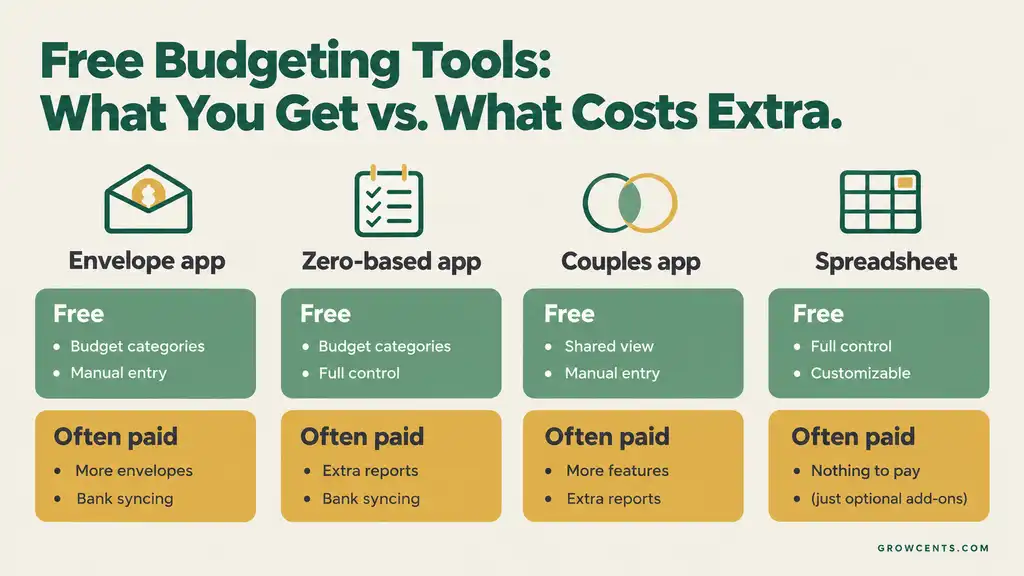
In the free plans checked for this guide, the pattern is consistent: the budgeting tools are free, and automatic bank syncing is what the paid plan adds. Goodbudget’s own help center lists bank syncing for U.S. banks as a Premium feature, and EveryDollar’s help center states that bank connection is not available in the free version. That is not necessarily a drawback for a beginner. Typing in each purchase takes a few seconds and keeps spending visible, and it avoids handing bank login details to a third party. The trade-off is time and consistency: a manual system only works if the entries actually get made.
Free Budgeting Options at a Glance
The table below summarizes what each option includes for free and what it leaves to a paid plan or to the user. Plan details change, so confirm on each company’s site before committing.
| Option | Budgeting Style | Included Free | Costs Extra or Not Included | Best For |
|---|---|---|---|---|
| Goodbudget | Envelope budgeting | 10 regular envelopes, 10 annual/goal envelopes, 1 account, sharing across 2 mobile devices, 1 year of transaction history, debt tracking | Premium adds bank syncing (U.S. banks), unlimited envelopes and accounts, 5 devices, and 7 years of history | Beginners who like giving each spending category its own limit |
| EveryDollar (free version) | Zero-based budgeting | Budget creation and manual transaction entry | Bank connection requires Premium; new users can try it free for 14 days | Beginners who want every dollar assigned before the month starts |
| Honeydue | Shared spending limits by category | Free to download and use; linked accounts, category spending limits, bill reminders, and in-app chat for two partners | Mobile app only; planning features are basic | Couples who want a shared view of accounts |
| Spreadsheet or printed worksheet | Whatever the user builds | Everything, since the tool itself is free | All entry, math, and upkeep are manual | People who want full control and no account sign-ups |
Free Plans at a Glance — Infographic
The Options in More Detail
Goodbudget: Envelope Budgeting
Goodbudget is built on the envelope method: income is divided into digital envelopes for categories such as groceries or gas, and spending comes out of the matching envelope. According to its help center, the free version includes 10 regular envelopes and 10 annual or goal envelopes, one account, sharing across two mobile devices, and a year of transaction history, and Premium is listed at $10 a month or $80 a year. The annual or goal envelopes suit irregular costs, which fits the household budget approach of dividing yearly expenses into monthly amounts. The main limit to watch is the envelope cap: a household with many separate categories may reach it quickly.
EveryDollar: Zero-Based Budgeting
EveryDollar is organized around zero-based budgeting, where income minus planned spending equals zero before the month begins. The free version supports building that monthly plan and adding transactions by hand; its help center states that automatic bank connection is included only with Premium and that new users can start a 14-day free trial. Bank connection in the app runs through the data-connection service Plaid, per the same help article, so anyone who prefers not to link a bank can stay on manual entry. Pricing for Premium changes, so the current amount is best checked on EveryDollar’s own site.
Honeydue: Budgeting for Two
Honeydue is aimed at couples. An independent NerdWallet review describes it as free to use and notes that it lets partners link accounts, decide how much to share, set category spending limits, and chat about specific charges. The same review points out its limits: features are fairly basic with limited ability to plan future spending, and there is no desktop version. It fits couples who mainly want visibility into shared spending rather than a detailed planning system.
Spreadsheet or Printed Worksheet
A spreadsheet in Google Sheets or Excel, or a printed worksheet, costs nothing and never changes its pricing. The FTC’s consumer education site offers a free budgeting worksheet that walks through income, fixed expenses, and variable expenses. Building a sheet from scratch takes longer than opening an app, but it also forces a clear view of every category, which is useful for a first budget.
Which Free Option Fits Which Situation
| If the Situation Is… | A Reasonable Starting Point |
|---|---|
| Spending tends to slip in a few categories, such as groceries or dining out | Goodbudget, since each category gets a fixed envelope |
| Income is steady and the goal is to plan every dollar in advance | EveryDollar’s free version |
| Two people share expenses and want the same view | Honeydue, or a shared spreadsheet |
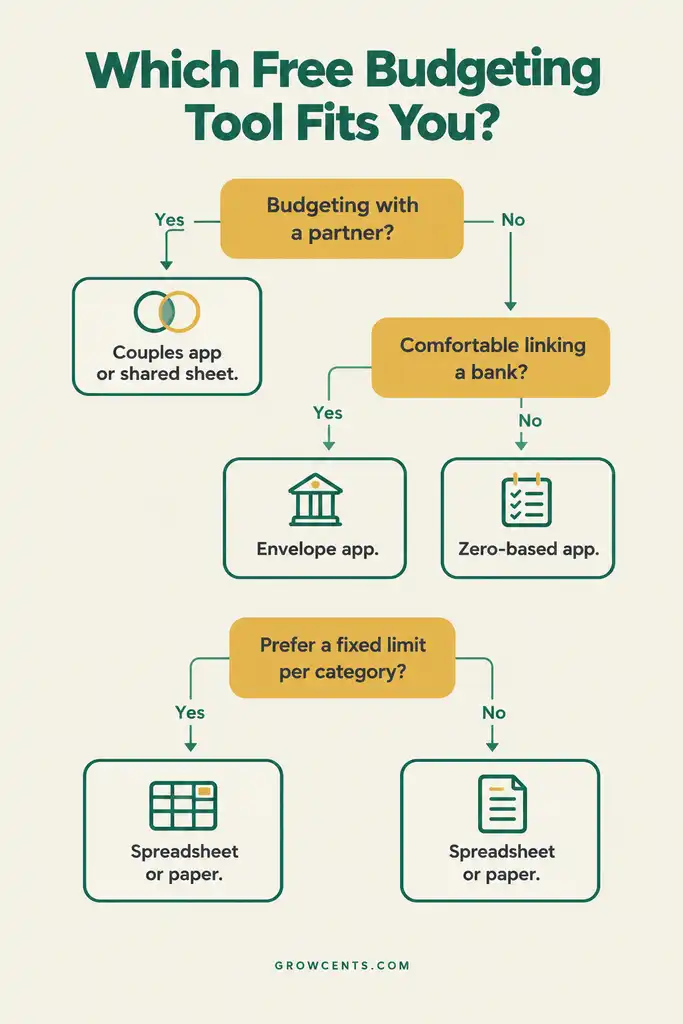
| Linking a bank account feels uncomfortable | Any manual option: Goodbudget free, EveryDollar free, or a spreadsheet |
| Manual entry has already failed once | Consider a paid plan with bank syncing, or a weekly check-in habit instead of daily entry |
Which Free Budgeting Tool Fits? — Decision Flowchart
Before Linking a Bank Account
Any app that syncs with a bank needs some form of access to account data, usually through a third-party connection service. A few habits reduce risk: read what the app says it will access and how long it keeps it, use a unique password and turn on two-step verification for the budgeting account, and link only the accounts the budget actually needs. Starting with manual entry for the first month or two is a reasonable way to learn the categories before deciding whether syncing is worth linking anything.
Setting Up a Free Budgeting Tool in 15 Minutes
- Pull the last month of bank and card statements and list take-home income and fixed bills.
- Create the categories that matter most: housing, utilities, groceries, transportation, savings, and one flexible “everything else” line.
- Enter planned amounts, using the household budget steps if the numbers are not yet worked out.
- Add a savings line, even a small one, so the starter emergency fund gets funded first rather than last.
- Set a weekly reminder to log spending and compare it against the plan; the grocery line is often the fastest to adjust, as covered in the guide to cutting a grocery bill.
Common Mistakes When Choosing a Budgeting App
- Choosing on features instead of habits. The best tool is the one that actually gets opened; a simpler app used weekly beats a powerful one abandoned in week two.
- Assuming free plans stay free. Plans, limits, and prices change, and whole apps close, as Mint did. Keeping an exportable copy of budget data is a sensible precaution.
- Building too many categories at once. Caps on envelopes or categories, where they exist, are easy to hit when every small expense gets its own line.
- Skipping the review step. Logging spending without ever comparing it to the plan turns a budget into a diary.
- Linking every account on day one. Connecting accounts before the categories are settled often produces a confusing first month.
Frequently Asked Questions
Is a free budgeting app good enough for a beginner?
Usually yes. The free plans covered here include the core budgeting tools; what they leave out is mainly automatic bank syncing and higher limits, which matter more once a budget is already working.
Are free budgeting apps safe?
Safety depends on the specific app and on what it is allowed to access. Manual-entry plans avoid linking a bank at all. For apps that do connect, reviewing what data is shared and using strong, unique login details are sensible steps.
What is the difference between envelope and zero-based budgeting?
Envelope budgeting sets a fixed amount for each spending category and stops spending when the envelope is empty. Zero-based budgeting assigns every dollar of income to a category so that income minus planned spending equals zero. Both start with the same income and expense numbers; they differ in how spending is controlled during the month.
Do free budgeting apps sell user data?
Business models differ from app to app, and each company’s privacy policy is the reliable place to check what is collected and shared. Reading it before linking any account is a good habit for any app, free or paid.
Is a spreadsheet better than an app?
Neither is better in general. A spreadsheet offers full control and no sign-ups; an app offers convenience and reminders. The right choice is whichever one gets used consistently.
How This Guide Was Built
This guide was researched using the companies’ own help pages where available, plus independent reporting, rather than personal anecdote or invented statistics. Goodbudget’s free and Premium plan details come from its help center; EveryDollar’s free-versus-Premium details come from its help center; Honeydue’s description draws on an independent NerdWallet review, and the worksheet option links to the FTC’s consumer.gov budgeting guide. The Mint shutdown date comes from Clark.com reporting. An app was included only if its free plan could be confirmed from a company page or an independent review; some well-known apps were left out because their current free offering was unclear or inconsistently reported. This guide has not tested each app hands-on and makes no claim to have done so. Free plans and prices change, so the linked company pages are the final word. GrowCents’ full research and sourcing approach is described on the Editorial Policy page and the About page.
This article is general educational information, not personalized financial advice, and does not recommend any product for any individual household. See the Disclaimer page for details.
